 Pigment
Your IDE theme,
everywhere.
Pigment re-colors every website you visit with the editor palettes you already love — not a generic dark mode, the real thing. Even the code blocks.
Getting started
Install the toolkit, then wire up your first build. The full reference covers every option.
const theme = pick('your-favorite');
await applyEverywhere(theme); // even code blocks
Real palettes
Pigment reads each page's color structure and maps it onto your theme — preserving brand colors, photos and contrast instead of inverting everything.
Code gets the full treatment
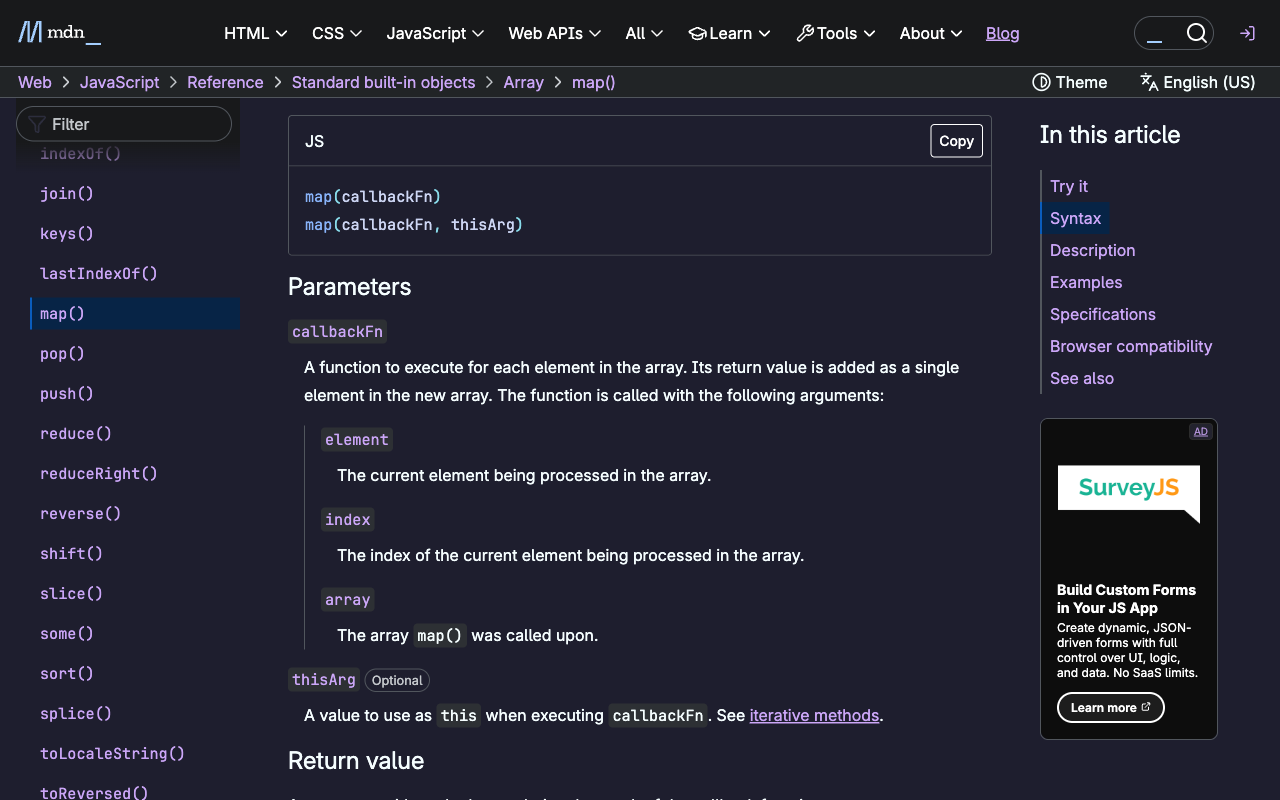
Stack Overflow, MDN, project READMEs — syntax highlighting is re-tokenized into your theme. The detail every dark-mode extension misses.
Built for the modern web
Shadow DOM, dynamic SPAs, frosted-glass headers, rich-text editors — Pigment keeps up as pages change.
The killer feature, in the wild
MDN in Tokyo Night — sidebar, prose, and re-tokenized code. Brand colors preserved.
Private by design
Pigment makes zero network calls. All color math happens on your device. No analytics, no telemetry, no account. You can confirm this yourself anytime in your browser's developer tools, under the Network tab.
Pricing
Free
$0
- Catppuccin Mocha, Nord & Solarized Light
- Every engine feature
- Forever
Pro
$4.99 one-time
- Unlocks all 8 themes — Catppuccin, Tokyo Night, Nord, Gruvbox, Monokai & more
- New themes added over time, always included
- No subscription, no account
- Works in every browser you use
FAQ
Is it a subscription?
No. Pro is a one-time $4.99 license key, delivered by email. It never expires and works on all your machines.
Does Pigment send my browsing data anywhere?
No. The extension makes zero network calls — theming is computed entirely on your device. See the privacy policy.
A site looks broken — what do I do?
Open the popup and flip “Pause on this site”. Pigment also ships paused on banking sites by default.
How do I report a site that looks wrong?
Send us the page URL, the active theme, and a screenshot — our reporting guide walks through exactly what to include.
Does it work in private/incognito windows?
Yes, if you allow it: chrome://extensions → Pigment → “Allow in Incognito”.
What about Safari and Firefox?
Safari (with iPhone/iPad support) and Firefox builds are in the works — same engine, same themes.
Why does it need access to all websites?
That's the product: Pigment themes whichever site you're on. Everything stays local — and you don't have to take our word for it: open your browser's developer tools and watch the Network tab, you'll see Pigment make no requests.
Get Pigment
Spot a site that looks off?
The web is messy, and a page or two will inevitably theme imperfectly. Tell us what looks wrong and we'll fix it — a quick note goes a long way.